For people running Claude Code on more than one thing at once

All your Claude Code agents, one tab.

ratchet is a local dashboard for your git repos. See what every agent is doing, start a new task in its own worktree, review the diff, open the pull request and watch CI, all without leaving the browser. When an agent needs you, your phone buzzes.

npm install -g @ratchet-ai/ratchet
Install guide
Windows 10/11 and macOSRuns on your machineUses your own Claude Code and GitHub logins
9:415G ▮▮▮
ratchet now

storefront · “Migrate orders to UUID keys” is waiting on you

storefront ▾+
Migrate orders to UUID keysWaiting on youdb/uuid-orders
Retry failed Stripe webhooksWorking18m · fix/webhook-retry
Dark mode for account settingsCI failedPR #214
Bump vitest to 3.2MergedPR #211
AgentsFilesGitGitHubMore

Example data. Click an agent in the desktop view to see its transcript.

What's inside

The things you tab between all day, in one place.

One tab per repo, a short menu on the left, one view at a time. No rules, nothing blocked. ratchet shows you what's happening and gets out of the way.

Agents

Every session, with its live transcript

Each Claude Code agent running against an open repo gets a card: what it's working on, which branch, its pull request and CI. Waiting on you shows in amber, so you answer the one agent that's stuck instead of checking five terminals.

● waiting Migrate orders to UUID keys db/uuid-orders · 4m
● working Retry failed Stripe webhooks fix/webhook-retry · 18m
● ci failed Dark mode for account settings PR #214 · lint
New task

A worktree per task, in one click

Type what you want done. ratchet makes a fresh worktree and branch and starts Claude in it, so parallel agents never step on each other's files.

Git

Changes, commits, branches

Read the diff an agent left behind, commit it, see ahead/behind counts and switch branches without a terminal.

GitHub

Pull requests and CI runs

Open PRs and recent Actions runs for the repo, next to the agent that made them. A red check shows on the agent's card.

Files

Browse and search the repo

Find a file, read it with syntax highlighting, open it in your editor.

Machine

Know when the PC is struggling

CPU, memory, disk and every running Claude process. Close the sessions you don't need. Leftovers from ratchet's own agents are cleaned up for you. Windows for now.

CPU ▁▂▂▃▅▃▂▂ 23%
RAM ▅▅▆▆▇▆▆▆ 11.8 GB
4 Claude sessions · 0 leftover
Updates

One-click update

When a new version is out, a banner shows what's new and updates ratchet for you.

Start-up check

Tells you what's missing

Checks Node, git, GitHub CLI and Claude Code when it starts, and says exactly how to fix anything that isn't there.
On your phone

Walk away from the desk. The agents keep going.

Turn on phone access and open the same workspace from your phone. Add it to your home screen and it works like an app.

Alerts for what mattersA push alert when an agent asks a question, wants permission, finishes, or its pull request fails CI. Pick which ones and set quiet hours in Settings.

Answer and move onTap the alert to land on that agent, read what it asks, answer it, and it carries on.

Off until you switch it onPhone access stays off by default. When on, it reaches your PC over your own Tailscale network. Pair with a QR code.

18:02▮▮▮
payments-api+
Idempotency keys on refundsWorking32m
Add OpenTelemetry spansWorking9m
Fix flaky currency testDonePR #88
Upgrade to Node 22Idle2h
AgentsFilesGitGitHubMore
18:04▮▮▮
‹ Migrate orders to UUIDWaiting

Read db/migrations/0042_orders.sql

Bash npm run db:check

1,284,019 rows in orders

The new uuid column is filled and the app reads from it. The old integer id is still there.

Drop the old id column now?
Drop it in this migrationSmaller table, no way back
Keep it for one releaseRemove in a follow-up PR
18:10▮▮▮
Pull requests3 open
#214 Dark mode for account settings1 check failedlint
#213 Retry failed Stripe webhooksCI running3/5
#212 Orders: UUID keysDraft+412 −96
AgentsFilesGitGitHubMore
Plugins

Bring your own flows.

Plugins change how agents start and react to what they do. Add the ones you want, write your own with Claude, and share them with a git link.

New. Comes with the first release after 0.2.1.

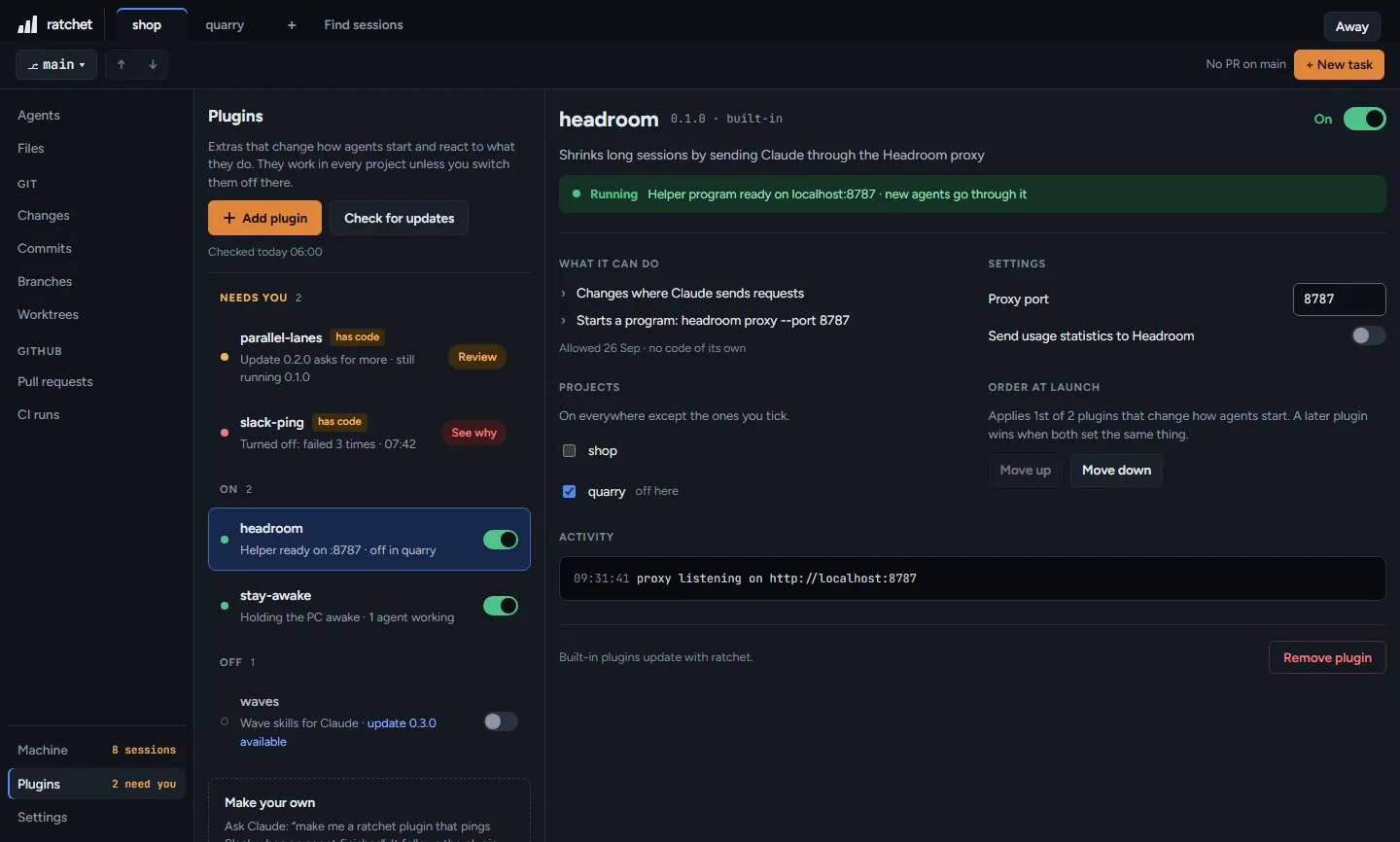
Your flow, not a built-in oneSend Claude through the Headroom proxy, keep the PC awake while agents work, or have a plugin run checks and ask you to approve or reject before a merge.

From a folder, a git link or a packA pack is one file that lists several plugins, so a team can hand out the same set.

See what it can do, then allow itThe Allow dialog lists every permission in ratchet's own words. Nothing runs until you tap Allow, and plugins with code say so.

Off where you don't need itSwitch a plugin off for one project, change its settings, and see its activity. After 3 failures in a row it turns itself off, and your agents keep going.

Updates that only tell youOnce a day ratchet checks each plugin's git link and says when an update is out. Nothing changes until you press Update, and an update that asks for more waits for your Allow.

127.0.0.1:4700
The Plugins page in ratchet: plugins grouped by Needs you, On and Off, with the Headroom plugin open showing its running helper, what it can do, its settings and the projects it is off in.
Why not just Claude Code

Claude Code's own remote is good. Here's what it leaves out.

Remote Control, the desktop app and agent view already cover a lot: several sessions, worktrees, phone alerts. ratchet fills the gaps that are left, and works alongside them.

ratchetRemote Control + Claude appClaude desktop appAgent view (claude agents)
Shows agents you started in a normal terminalYesPlain claude, no flagOnly if started for itNeeds the remote-control flag or auto-connectNoTerminal sessions don't appearAfter you background themOpen sessions in other terminals stay hidden
Git changes, commits, branches, PRs and CI for code on your PC, from your phoneYesNoPhone gets git and PR views only for cloud sessionsNoDesktop onlyNoNo phone access
Works with API keys, Bedrock, Vertex or a company gatewayYesratchet uses whatever Claude Code usesNoNeeds a claude.ai planPartlyRemote access needs a claude.ai planYes
Team and Enterprise plans, no admin switchYesOff by defaultAn admin has to turn it onYesYes
Where phone traffic goesYour own private networkTailscale, PC to phoneThrough Anthropic's serversThrough Anthropic's serversNo phone access
Most multi-agent tools only see their own agentsClaude Squad, Vibe Kanban and Crystal show the agents they started. Happy needs you to run happy claude instead of claude. ratchet picks up the sessions you already have.
Windows and Mac, both first-classConductor and Sculptor don't run on Windows. Every ratchet release is tested on a Windows PC and a Mac before it ships.
No account, no serverNo ratchet login and no ratchet cloud. Your GitHub and Claude logins stay on your PC.

Based on each product's public docs, checked September 2026.

Install

Running in under a minute.

  1. Install the package

    One global npm install. Needs Node 22.12 or later.

  2. Start it

    Type ratchet. It checks your setup and opens in your browser.

  3. Add a repo

    Pick a folder, or let ratchet find repos from your recent Claude Code sessions.

  4. Start a task

    Press New task, describe the work, and watch the agent go.

You'll need

  • Windows 10 or 11, or macOS
  • Node.js 22.12 or later
  • git, and GitHub CLI signed in (gh auth login)
  • Claude Code. On Windows, the native install (claude install)
PowerShell
PS> npm install -g @ratchet-ai/ratchet
added 1 package in 6s

PS> ratchet
ratchet 0.2.1
  ✓ Node 22.20
  ✓ git 2.47.0
  ✓ GitHub CLI 2.60.0
  ✓ Claude Code 2.1.0
Opening http://localhost:4700 …

Scripts disabled? run ratchet.cmd instead, or once:
Set-ExecutionPolicy -Scope CurrentUser RemoteSigned

To update later: press Update now on the banner, or run npm install -g @ratchet-ai/ratchet@latest.

No account, no ratchet serverratchet runs on your PC with your own GitHub and Claude Code logins. Phone access uses your own Tailscale network, and alerts go through your phone's push service.
Doesn't change how Claude runsIt reads Claude Code's own transcripts and project files. It doesn't intercept or modify your sessions.
Free to useFSL-1.1-MIT licence. Use it at work or at home. Each release becomes MIT two years after it ships.
Questions

Good to know.

Does it cost anything?

No. ratchet is free. You pay for Claude Code as you do today.

Does it work with agents I started in my own terminal?

Yes. Any Claude Code session running against a repo you've added shows up on the Agents view with its transcript.

Does it replace Claude Code?

No. Claude Code does the work. ratchet is the place you watch, start and review that work across repos.

How does phone access reach my PC?

Through your own Tailscale network. It's off until you turn it on in Settings, and you pair each phone by scanning a QR code.

Can I merge pull requests in ratchet?

Not yet. You open and review PRs in ratchet, then merge on GitHub.

Where does it keep its data?

In the ~/.ratchet folder: the repos you added, the agents ratchet started, your settings and paired phones. Delete the folder to reset ratchet.

Linux?

Not yet. Windows 10/11 and macOS today.

What if something is missing on my PC?

ratchet checks when it starts. If Node or git is missing it tells you the fix and stops. If GitHub CLI or Claude Code is missing it starts anyway and turns off only the views that need them.

Stop checking five terminals.

Install ratchet, add a repo, start a task.

npm install -g @ratchet-ai/ratchet

ratchet is an independent project by Shervin Davarifard. Questions or problems: hello@ratchet.build.© 2026 Shervin Davarifard · FSL-1.1-MIT licence